
Let’s face it: broken image links are like ghosts haunting your website – annoying, scary for your users, and not great for your SEO.
That’s why I’m excited to release the Broken Image Scanner , a free WordPress® plugin designed to help you hunt down and fix those pesky broken image URLs.
In this post, I’ll walk you through how to use the plugin, why it’s useful, and (hopefully) crack a smile or two along the way.
What Does the Plugin Do?

The Broken Image Scanner scans your site for image links that don’t work anymore.
It checks posts, pages, and all public custom post types for <img> tags, tests if those URLs are reachable, and compiles a neat list of the ones that are broken.
Once the scan is done, you can download the results as a CSV file and even jump straight to editing the affected posts.
Think of it like having a metal detector at the beach, except instead of finding coins, you’re finding problems to fix.
Why Is This Useful?
Broken images are bad news for any site. Here’s why you want to avoid them:
- Bad User Experience: Nobody likes seeing those “X” marks or broken icons where an image should be. It looks unprofessional and disrupts the flow of your content.
- SEO Impact: Search engines don’t like broken links of any kind. Missing images can hurt your rankings.
- First Impressions Matter: Whether it’s a product photo, a blog post image, or your logo, every image on your site plays a role in how people perceive your brand.
This plugin makes it easy to find and fix these issues without having to manually comb through every post.

How to Use the Plugin
1. Install and Activate :
- Download the plugin and activate it from the WordPress® admin panel. Easy-peasy.
2. Run a Scan :
- Head to the Image Scanner page in your WordPress® admin menu.
- Click the Start Scan button. The plugin will start scanning your content, and you’ll see a progress bar keeping you updated.
3. Review the Results :
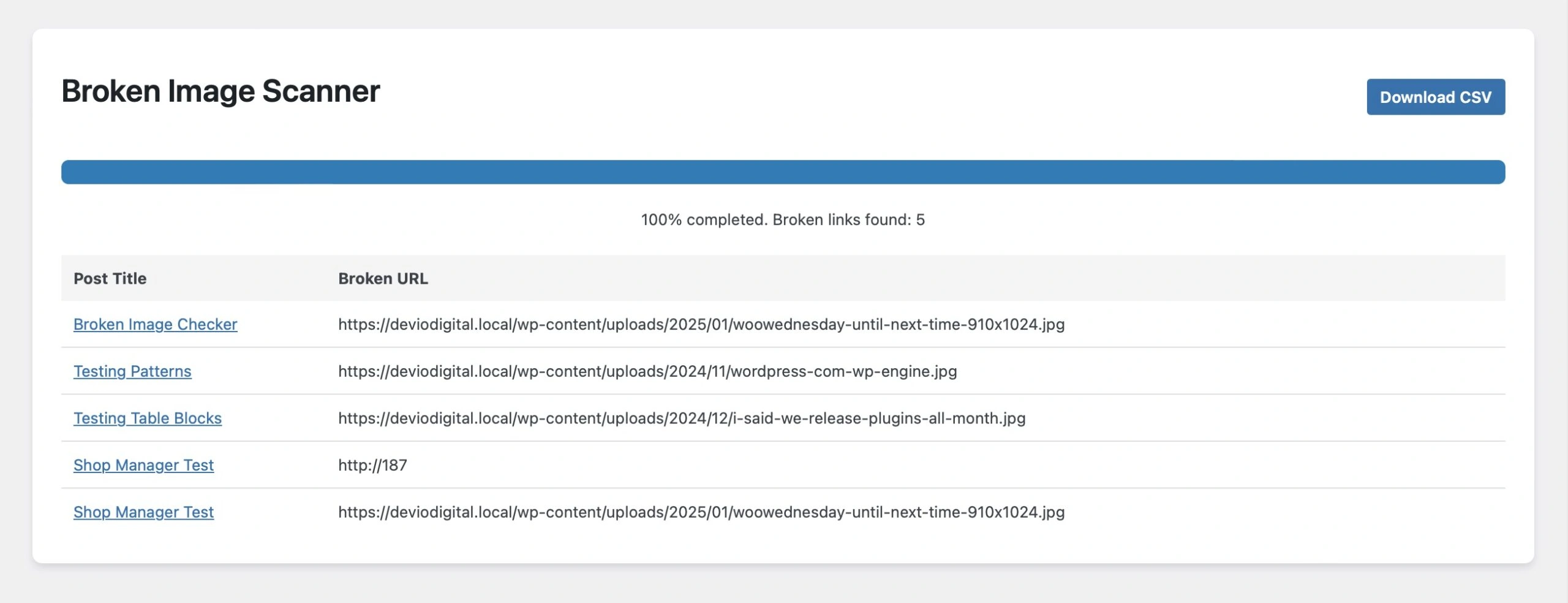
- As the scan progresses, a table will populate with all the broken image URLs the plugin finds.
- Each row includes the post title (linked to the WordPress® editor) and the broken image URL. You can jump directly into fixing things without losing your place.
4. Download the Results :
- Once the scan is complete, the Start Scan button transforms into a Download CSV button.
- Click it to grab a CSV file with all the broken links. The file is named after your site and timestamped, so you’ll always know when the scan happened. (No more mystery files cluttering your desktop – you’re welcome.)
What’s Under the Hood?
The plugin scans your content in batches to avoid overloading your server.
It sends a HEAD request to each image URL to check if it’s reachable. If it gets an error (or no response at all), that URL is flagged as broken.
The progress bar keeps you updated throughout, and the results are displayed in a simple, sortable table.
Bonus: the first column of the table is fixed at 200px wide, so your data doesn’t look like it’s doing yoga.
Who Should Use This Plugin?
This plugin is perfect for anyone managing a WordPress® site with lots of media:
- Bloggers with a backlog of posts (because who remembers which images were linked five years ago?).
- E-commerce site owners who rely on product photos.
- Agencies managing client sites and needing to clean up before handing over the reins.

Why I Built This Plugin
I noticed that broken images are one of those problems that creep into even the best-maintained sites.
Maybe a file gets deleted. Maybe an external image link stops working. Whatever the reason, fixing broken images has always been tedious – until now.
So, I made a tool that simplifies the process. And hey, if it saves you an hour (or five) of your time, I’ll consider this project a success.
Broken images might be inevitable, but fixing them doesn’t have to be a headache.
With the Broken Image Scanner, you can quickly identify the issues and clean up your site with just a few clicks.
Thanks for checking out the plugin! If you have any feedback or suggestions, shoot me a message, and happy scanning 🤘