
I’m excited to announce the launch of my 6th new free plugin in the last 11 days 🚀
Content Restriction for WordPress® , a sophisticatedly simple solution for managing content visibility on your WordPress® site.
With the flexibility to restrict content based on user roles, post types, and even individual posts or taxonomy terms, this plugin gives site owners complete control over who can view specific content.
Here’s a rundown of what makes Content Restriction for WordPress® a must-have for WordPress® administrators looking to fine-tune content access:
Key Features
- Role-Based Content Restriction : Set the minimum user role required to access specific content. Choose to restrict your content globally by post type or taxonomy term, or apply restrictions at the individual post/page level.
- Automatic Redirection : Unauthorized users who attempt to access restricted content will be redirected to the login page. This feature creates a streamlined user experience while simultaneously protecting your content.
- REST API and RSS Feed Integration : Content restrictions extend to REST API responses and RSS feeds, ensuring restricted content remains private across all access points.
- Customizable Messages : Tailor the restriction messages your users see when they’re unable to view content, whether they’re browsing the site, using an RSS feed, or connecting through the REST API.
How to Use Content Restriction for WordPress®
1. Setting Up Global Restrictions
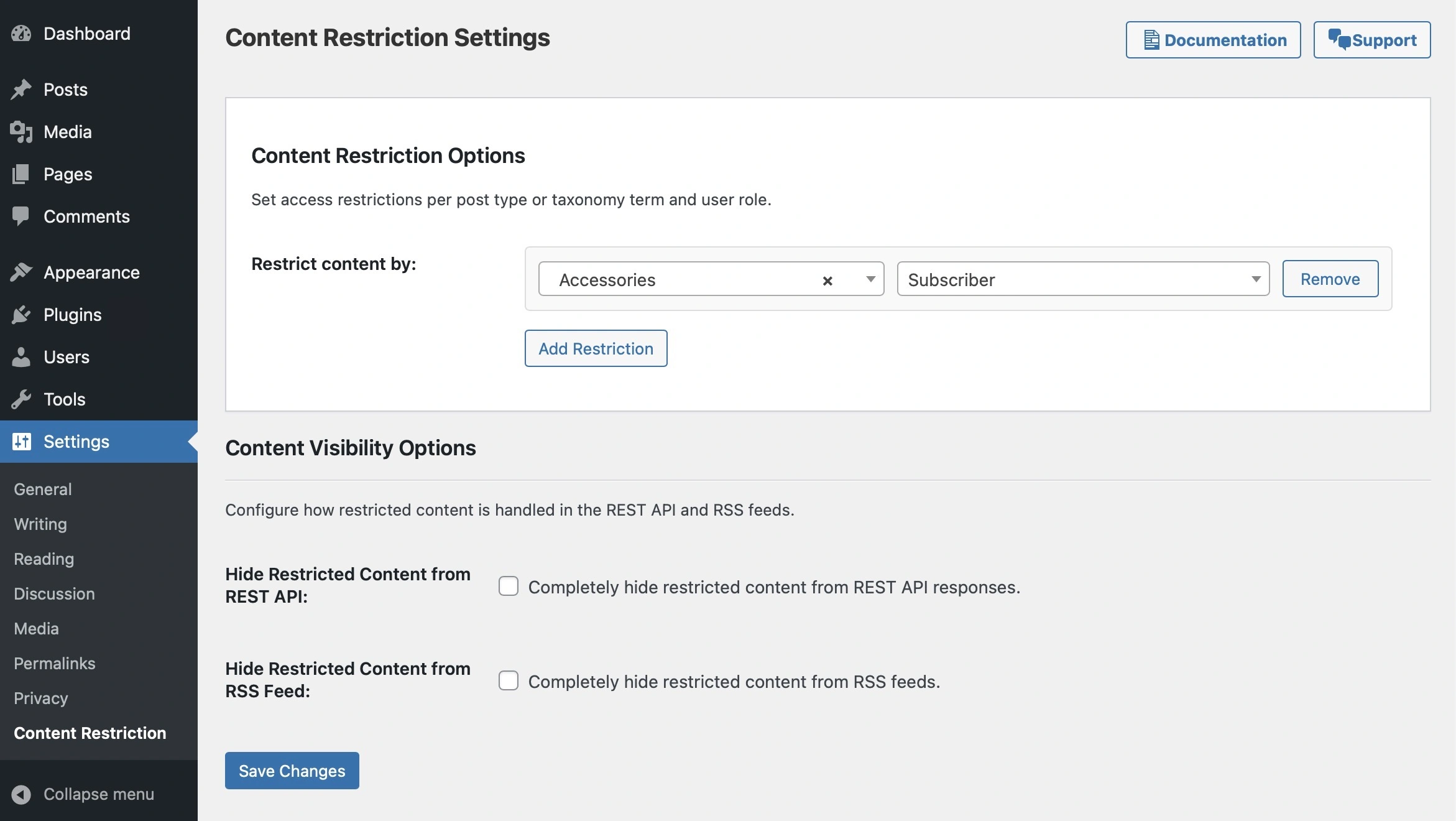
From your WordPress dashboard, navigate to Settings > Content Restriction.
There, you can add restrictions by post type or taxonomy term and specify the minimum role required for access.
Save your settings, and your content is secured!
2. Applying Individual Restrictions
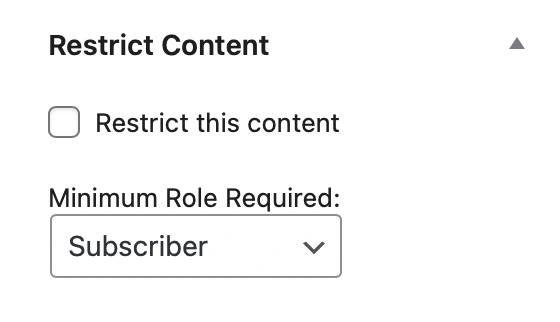
You can also set custom restrictions for specific posts and pages.
In the editor, look for the Restrict Content metabox, where you can enable restriction and select a minimum role for access.
Publish or update your post, and only the users with the correct role will see it.
Filters and Developer Customization
I’ve designed the plugin to be highly customizable, offering developers several filters to adjust restriction messages for different scenarios, including the REST API and RSS feeds.
Here are a few examples:
crwp_restricted_content_message: Modify the message for unauthorized users on the site.crwp_restricted_rest_message: Customize the message in REST API responses.crwp_restricted_feed_message: Alter the message displayed in RSS feeds.
These filters make it easy to align the plugin’s behavior with your brand voice and UX requirements.
Installation and Getting Started
To get started, download the plugin from the GitHub repository, install it on your WordPress® site, and activate it.
Full installation instructions and setup details are available in the plugin’s documentation.
FAQs
Q: Does this plugin support custom post types and taxonomies?
A: Absolutely! Content Restriction for WordPress® works with all public custom post types and taxonomies registered in WordPress.
Q: Can I restrict content to multiple user roles?
A: The plugin allows you to set a minimum role for access. Any user with that role or higher will be able to view restricted content.
Q: How does the plugin handle restricted content in RSS feeds and the REST API?
A: You can choose to hide restricted content or display a restriction message in RSS feeds and the REST API, depending on your preference.

Future plans
I welcome any thoughts and ideas from the community on ways this plugin could be better!
Check out the GitHub repository to report issues, submit ideas, or make contributions to future versions.
Download Content Restriction for WordPress® Now
Thank you for your support, and I’m forward to seeing how Content Restriction for WordPress® helps you create secure, role-based content experiences for your users 🤘💯