
Today I’m happy to announce the release of User Login Status , a WordPress plugin designed to help administrators easily monitor user activity and manage user sessions with ease.
This plugin comes with a couple key features that allow you to quickly identify which users are logged in and take action by logging them out en-masse if needed.
In this blog post, we’ll cover the plugin’s core functionality, technical details, and how to use it effectively on your site.
Key Features
1. Monitor User Status Directly in the Admin Panel
With User Login Status , you can view user login statuses directly from the Users table in the WordPress admin area:
- Green Circle : Indicates the user is currently logged in.
- Red Circle : Indicates the user is logged out or inactive.
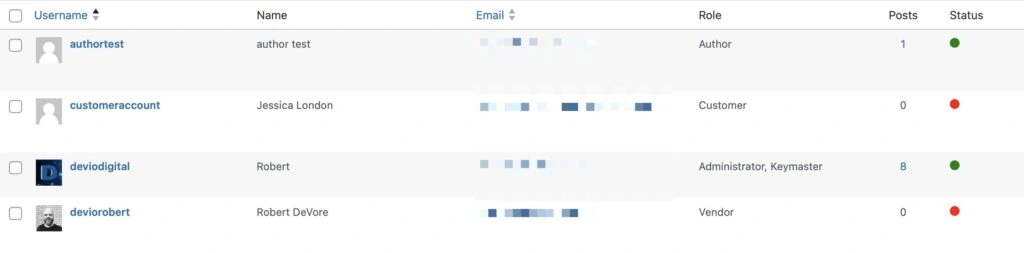
This visual indicator allows for quick and easy monitoring of user activity without navigating through logs or third-party tools.
2. Bulk Logout Functionality
The plugin also provides a Bulk Action in the Users table, allowing administrators to log out multiple users at once.
- Select users from the list.
- Choose the Log Out Users option from the bulk actions dropdown.
- Users will be logged out immediately, and their session tokens cleared.
3. Real-Time AJAX Polling
The plugin uses AJAX polling to check user statuses every 30 seconds, ensuring that the displayed statuses are as up-to-date as possible.
This allows you to monitor real-time changes in user activity without needing to refresh the page.
4. Optimized for Admins
- Permissions Check : Only users with the appropriate permissions (i.e., those who can manage users) will be able to use the bulk logout feature.
- Responsive Design : The status indicators are optimized for both desktop and mobile views, ensuring administrators can manage user sessions from any device.
Installation and Usage
1. Download and Install the Plugin
- Download the User Login Status plugin from the plugin’s GitHub page.
- Install and activate the plugin via the Plugins section in the WordPress admin.
2. How to Monitor User Status
Once the plugin is activated:
- Navigate to the Users section from the WordPress admin dashboard.
- Look for the Status column to view a green (logged in) or red (logged out) circle next to each user’s name.
3. How to Bulk Log Out Users
- Select the user(s) you want to log out by checking the box next to their name(s)
- In the bulk actions dropdown, select Log Out Users.
- Apply the action, and those users will be immediately logged out.
Technical Details
1. Session Tokens
The plugin relies on WordPress’s built-in session tokens to determine if a user is logged in or not. This is to ensure accuracy and compatibility with WordPress’s existing session management features.
2. AJAX Polling for Real-Time Status
The plugin utilizes AJAX to update user statuses dynamically every 30 seconds. This keeps the admin interface in sync with real-time changes, ensuring that any user login or logout is reflected immediately.
3. Bulk Action Handling
A new bulk action called Log Out Users is added to the users table. This action uses the bulk_actions-users filter to add a custom bulk action, and the handle_bulk_actions-users filter to process the logouts.
This process makes sure that selected users are securely logged out, and their session tokens are cleared properly.
4. Security Considerations
- Role-Based Access Control : Only administrators or users with the ability to manage other users can see and use the log out functionality.
- Nonce and Permissions Check : AJAX requests to log out users are secured using nonces and user capability checks, ensuring that only authorized actions are processed.
Roadmap for Future Releases
I’m planning to add more features in the future, including:
- Customizable Session Expiration : Allow administrators to set custom session expiration times.
- User Notifications : Notify users when they are logged out by an admin.
- Extended Filters and Sorting : More advanced options for filtering users based on their login status.
Download the User Login Status plugin
Get the User Login Status plugin today and start managing user sessions more effectively 🤘