
Another day, another plugin release 💪
I’m happy to launch Widget Usage Tracker for Elementor , a WordPress® plugin designed to help you monitor and analyze the usage of Elementor widgets across your website.
Whether you’re a developer, designer, or site administrator, this plugin provides invaluable insights to optimize your site’s performance and user experience.
What is Widget Usage Tracker for Elementor?
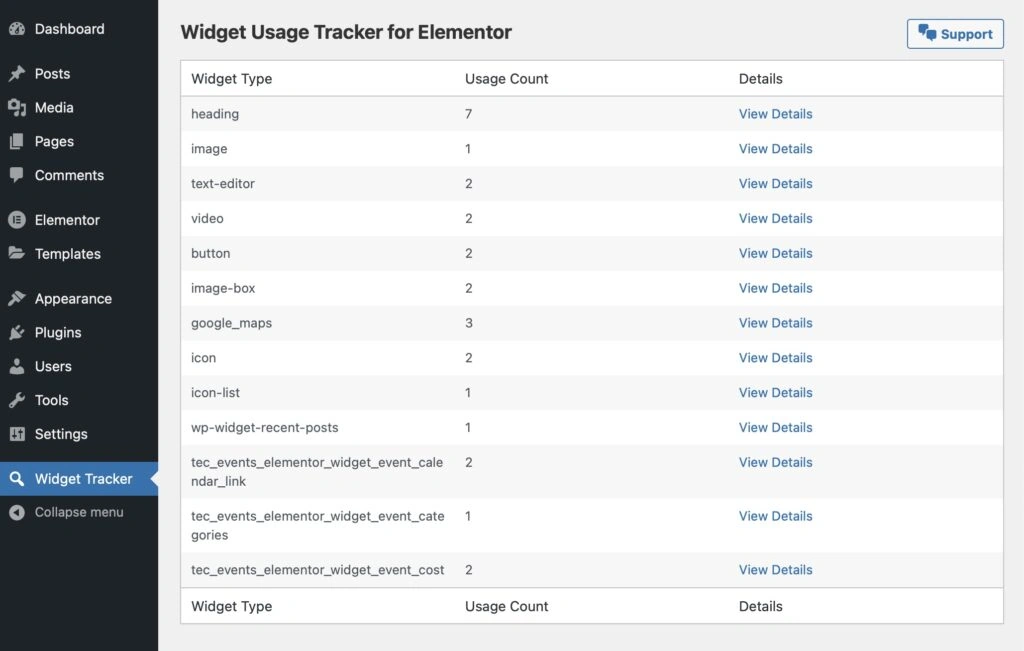
Widget Usage Tracker for Elementor is a comprehensive tool that tracks all registered Elementor widgets on your WordPress® site, displaying their usage counts and providing detailed information about where each widget is used.
With this plugin, you can identify the most frequently used widgets, streamline your widget library, and ensure your website remains efficient and user-friendly.
Key Features
1. Comprehensive Tracking
Automatically tracks every Elementor widget used on your site, providing real-time usage counts. Gain a clear understanding of which widgets are most popular and which ones are underutilized.
2. Detailed Insights
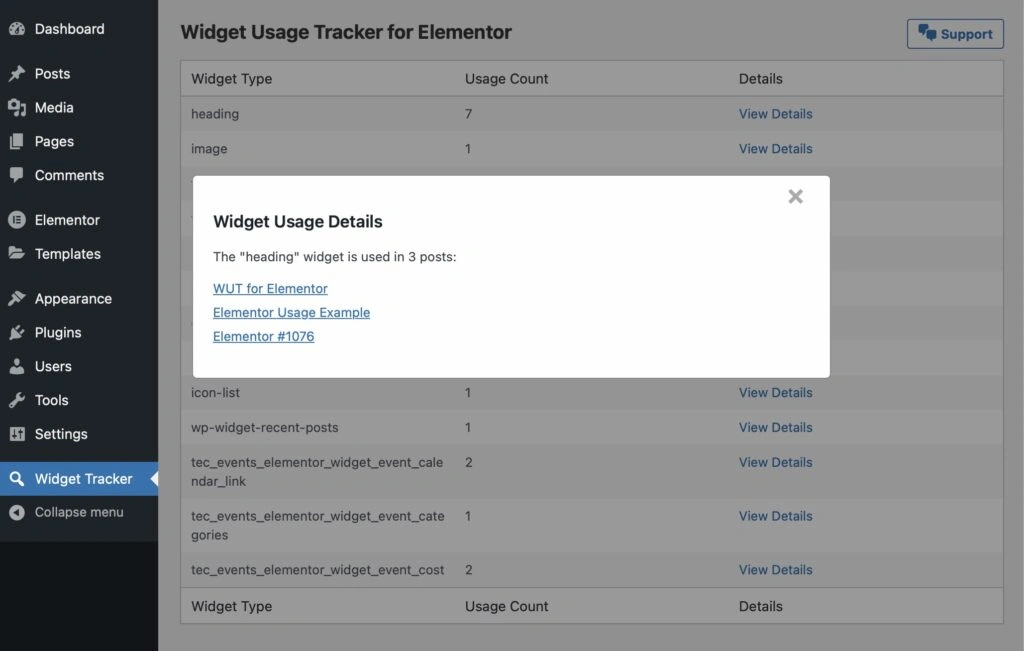
View detailed information about where each widget is used, including direct links to the specific pages or posts. This feature helps you manage content more effectively and make informed decisions about widget usage.
3. User-Friendly Interface
The plugin integrates seamlessly into your WordPress admin dashboard, offering an intuitive interface with sortable tables and interactive modals. Easily navigate through your widget data without any technical hassle.
4. Automatic Updates
Stay up-to-date with the latest features and security patches. The integrated update checker ensures that your plugin remains current, providing a smooth and secure experience.
5. Localization Ready
Fully translatable, allowing you to use the plugin in your preferred language. Expand your site’s reach by catering to a diverse audience.
6. Optimized Performance
Efficiently stores widget usage data in custom database tables, ensuring quick access and minimal impact on your site’s performance.

Installation Guide
Step-by-Step Installation
1. Download the Plugin:
- Via GitHub:
- Clone the repository:
git clone https://github.com/robertdevore/widget-usage-tracker-for-elementor.git
- Or download the ZIP file from the GitHub repository.
2. Upload to WordPress:
- Via FTP:
- Upload the
widget-usage-tracker-for-elementorfolder to the/wp-content/plugins/directory. - Or Via the WordPress Admin Dashboard:
- Navigate to Plugins > Add New.
- Click on Upload Plugin.
- Choose the downloaded ZIP file and click Install Now.
3. Activate the Plugin:
- Go to Plugins > Installed Plugins in your WordPress dashboard.
- Locate Widget Usage Tracker for Elementor and click Activate.
4. Initial Setup:
- Upon activation, the plugin will create two custom database tables:
wut_widget_usage_counts: Stores the usage count for each widget.wut_widget_usage_posts: Stores the association between widgets and post IDs where they are used.- A scheduled cron event will be set up to update widget usage counts hourly. The plugin also triggers an immediate update upon activation.
How to Use Widget Usage Tracker
Accessing the Tracker
After activation, navigate to Dashboard > Widget Tracker in your WordPress admin menu.
Viewing Widget Usage
- Dashboard Overview:
- The main page displays a table listing all registered Elementor widgets along with their usage counts.
- Widget Type: The name of the Elementor widget.
- Usage Count: The number of times the widget is used across the site.
- Details: A link to view detailed information about where the widget is used.
Viewing Detailed Widget Usage
1. Click on “View Details”:
- Each widget row has a View Details link. Click on it to open a modal window.
2. Explore Widget Locations:
- The modal displays a list of pages or posts containing the selected widget.
- Click on any link within the modal to navigate directly to the content where the widget is implemented.
Uninstallation Process
If you decide to uninstall Widget Usage Tracker for Elementor , rest assured that the plugin cleans up after itself:
- Database Cleanup:
- Removes the custom database tables
wut_widget_usage_countsandwut_widget_usage_posts. - Cron Job Removal:
- Clears the scheduled cron event related to widget usage tracking.
To uninstall:
1. Navigate to Plugins > Installed Plugins.
2. Deactivate and then Delete the Widget Usage Tracker for Elementor plugin.
3. The plugin will automatically handle the cleanup process.
Future Enhancements
I’m committed to improving Widget Usage Tracker for Elementor. Future updates will likely include the following:
- Advanced Filtering: Filter widget usage data based on date ranges, user roles, or specific post types.
- Export Functionality: Export widget usage data for external analysis or reporting.
- Performance Optimization: Further enhancements to ensure the plugin remains lightweight and efficient.
THANK YOU!
I appreciate anyone who uses the plugins I build and I value your feedback and contributions!
Whether you encounter a bug, have a feature request, or want to contribute code, your input helps make the plugin better.
- Report Issues: Open an issue on GitHub.
- Contribute: Fork the repository, make your changes, and submit a pull request.
- Support: Contact me through robertdevore.com for additional assistance as needed.